Passkeys replace vulnerable shared secrets (passwords) with asymmetric public-key cryptography standardized by FIDO2 and WebAuthn, making phishing, credential stuffing, and server database password leaks mathematically impossible.
Key Takeaways & Quick Summary
- Over 80% of enterprise data breaches trace back to stolen, weak, or reused passwords.
- Passkeys utilize public-key cryptography where private keys never leave the user's biometric secure enclave.
- Phishing attacks fail completely because browsers cryptographically bind WebAuthn challenges to the exact origin domain.
- Major operating systems (Apple, Google, Microsoft) synchronize passkeys end-to-end encrypted across user devices.
The Fundamental Flaw of Shared Secrets
For over half a century, computing security has relied on shared secrets: user credentials that must be stored by the user and remembered, then transmitted over a network to be verified against a hashed representation in a server database. In 2026, that paradigm is officially obsolete.
Shared secrets are fundamentally vulnerable to human psychology and network physics. Users reuse identical passwords across personal and corporate accounts, fall victim to sophisticated reverse-proxy phishing attacks (such as Evilginx), and suffer when third-party database breaches leak millions of hashed credentials onto dark web forums.
Passkeys, built on the FIDO2 and W3C WebAuthn standards, replace shared secrets with asymmetric public-key cryptography, delivering an authentication model that is mathematically immune to phishing.
How Passkeys Work: The Cryptographic Handshake
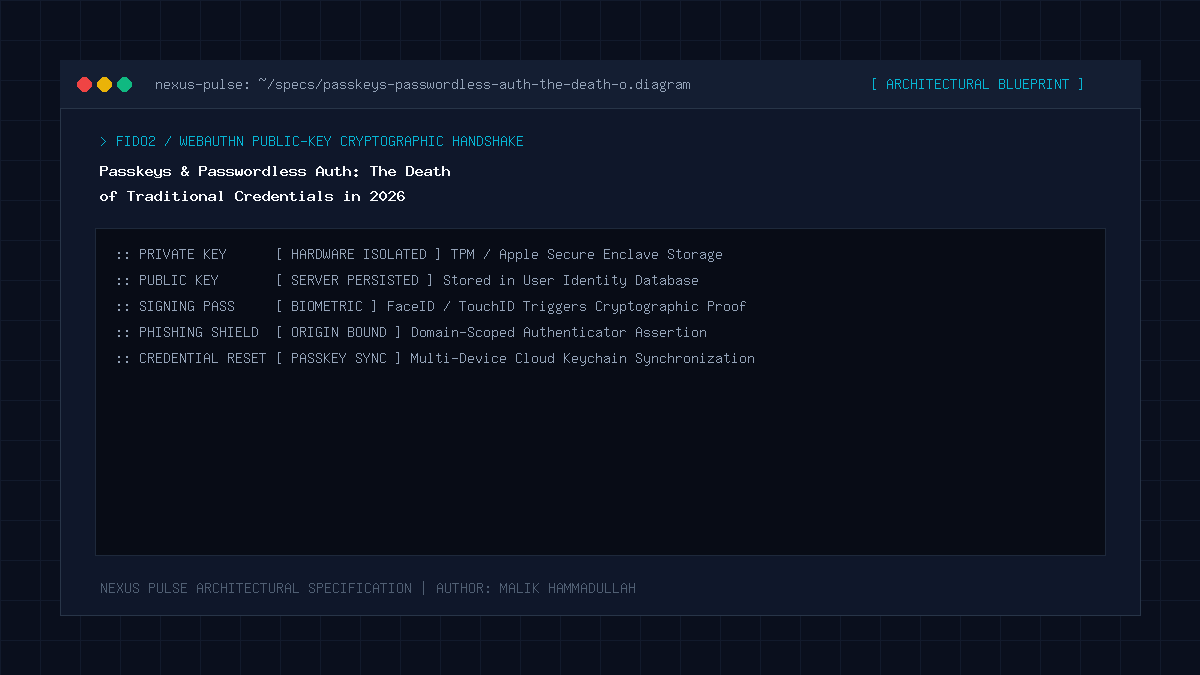
When a user registers an account on a passkey-enabled website, their device (smartphone, laptop, or hardware security key) generates a unique cryptographic key pair inside a tamper-resistant hardware security module (such as Apple’s Secure Enclave or a TPM chip).
The private key remains strictly locked inside the secure hardware and can only be unlocked via local biometric verification (Face ID, Touch ID, or Windows Hello). The public key is transmitted to the web server and stored in the database.
During subsequent logins, the server transmits a cryptographically random challenge. The user’s device signs the challenge with the private key and returns the signature. The server verifies the signature using the stored public key. At no point is any password or shared secret transmitted across the network.
The Death of Phishing Attacks
The most revolutionary feature of WebAuthn passkeys is cryptographic origin binding. When an attacker creates a pixel-perfect clone of your banking portal on a fraudulent domain (e.g., `bank-login-secure.com`), traditional two-factor SMS or TOTP codes can be intercepted in real time.
With passkeys, the web browser natively intercepts the authentication request and checks the digital signature against the true origin domain (`bank.com`). Because the domain names do not match, the browser refuses to release the private key signature. Phishing attacks fail instantly and completely, requiring zero user vigilance.
Implementation Blueprint for Developers
Integrating passkeys into modern web applications requires utilizing the native JavaScript `navigator.credentials.create()` and `navigator.credentials.get()` APIs, paired with robust backend validation libraries (such as SimpleWebAuthn for Node.js or pywebauthn for Python).
Developers must support account recovery fallbacks, multi-device passkey synchronization via cloud keychains (iCloud Keychain, Google Password Manager), and enterprise policy enforcement for hardware security keys like YubiKeys.
Passkeys & Passwordless Auth: Architecture & Technical Specifications Matrix
Traditional Passwords vs Passkeys (Authentication Security & UX Matrix):
| Security Dimension | Passwords + SMS/TOTP 2FA | FIDO2 / WebAuthn Passkeys |
|---|---|---|
| Phishing Resistance | Vulnerable to adversary-in-the-middle (AitM) proxies | 100% Phishing Proof (Cryptographic Origin Binding) |
| Credential Theft from Server | High risk if database password hashes are leaked | Zero risk (Server only holds useless public keys) |
| User Experience | Tedious typing, password managers, SMS delays | Instant 1-second biometric login (Touch ID / Face ID) |
| Credential Stuffing Risk | Extreme (Reused passwords across services) | Zero (Unique cryptographic key pair per website) |
| Account Takeover Rate | Accounts compromised in millions annually | Virtually zero across millions of active passkey logins |
Official Specifications & Primary Sources
Architectural specifications, model capabilities, and benchmark evaluations in this guide are cited from official documentation and published papers (verified as of October 2026):
- FIDO: FIDO Alliance: Passkeys Overview & Technical Implementation
- MDN: MDN Web Docs: Web Authentication (WebAuthn) API
- Apple: Apple Developer: Supporting Passkeys in Web Applications
Passkeys & Passwordless Auth: Engineering Questions & Practical Considerations
What happens if I lose my phone with my passkeys?
Because passkeys are synchronized end-to-end encrypted through your Apple ID, Google Account, or password manager cloud keychain, your passkeys restore automatically on any new verified device.
Can a website see my biometric data when I use Touch ID or Face ID?
No. Biometric verification occurs entirely locally on your device hardware chip. The website only receives a cryptographic signature, never your fingerprint or facial scan.
Is it hard to add passkeys to an existing WordPress website?
No. Modern WordPress sites can enable WebAuthn passkeys easily using verified open-source authentication plugins that integrate natively with the WordPress REST API.
Join Our Official WhatsApp Channel
Get instant notifications for breaking AI developments, developer security guides, and tech intelligence directly on WhatsApp.

Recommended Reading